

The Salesforce Spring ‘24 release has begun rolling out. With the final updates releasing in early February, it’s a good time to review the best admin updates and changes to look out for.
When Is The Salesforce Spring ‘24 Release Date Schedule?
As stated by Salesforce, the Salesforce Spring ‘24 release date schedule includes the following weekends:
- January 12, 2024
- February 2, 2024
- February 9, 2024
Salesforce recommends checking the Maintenance Calendar to know when your Salesforce org will get the Spring ’24 features. Complete this by scrolling through the list and checking your Salesforce instance – NA, EMEA – against those listed in the calendar.
With the first weekend now passed, you can find the best features of the Salesforce Spring ‘24 release listed below.
Salesforce Analytics: Lightning dashboard Visualizations & Transfer Options
Salesforce has enhanced its Lightning dashboards across all editions to include rich text and image widgets to use in charts, define metrics and KPIs, and simplify tables. Other updates include incorporating company logos, branding elements, flow diagrams, and embedded images. Additionally, the dashboards offer guidance through data with clear section titles, narrative text, and even the option to use animated GIFs for a more dynamic experience.
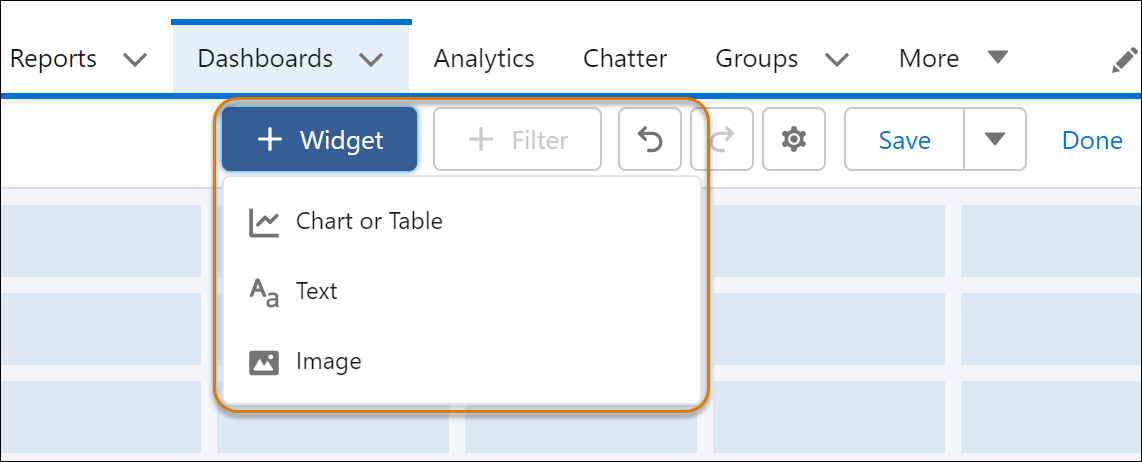
You should also note that dashboard components are now universally referred to as ‘widgets’ across all editions. There is now a mix of options, including up to 20 charts and tables, two image widgets, and 25 rich text widgets, expanding from the previous limit of 20 widgets. Are you looking to try out the new feature? When editing a dashboard, click +Widget and select the type of widget to add to complete the process.
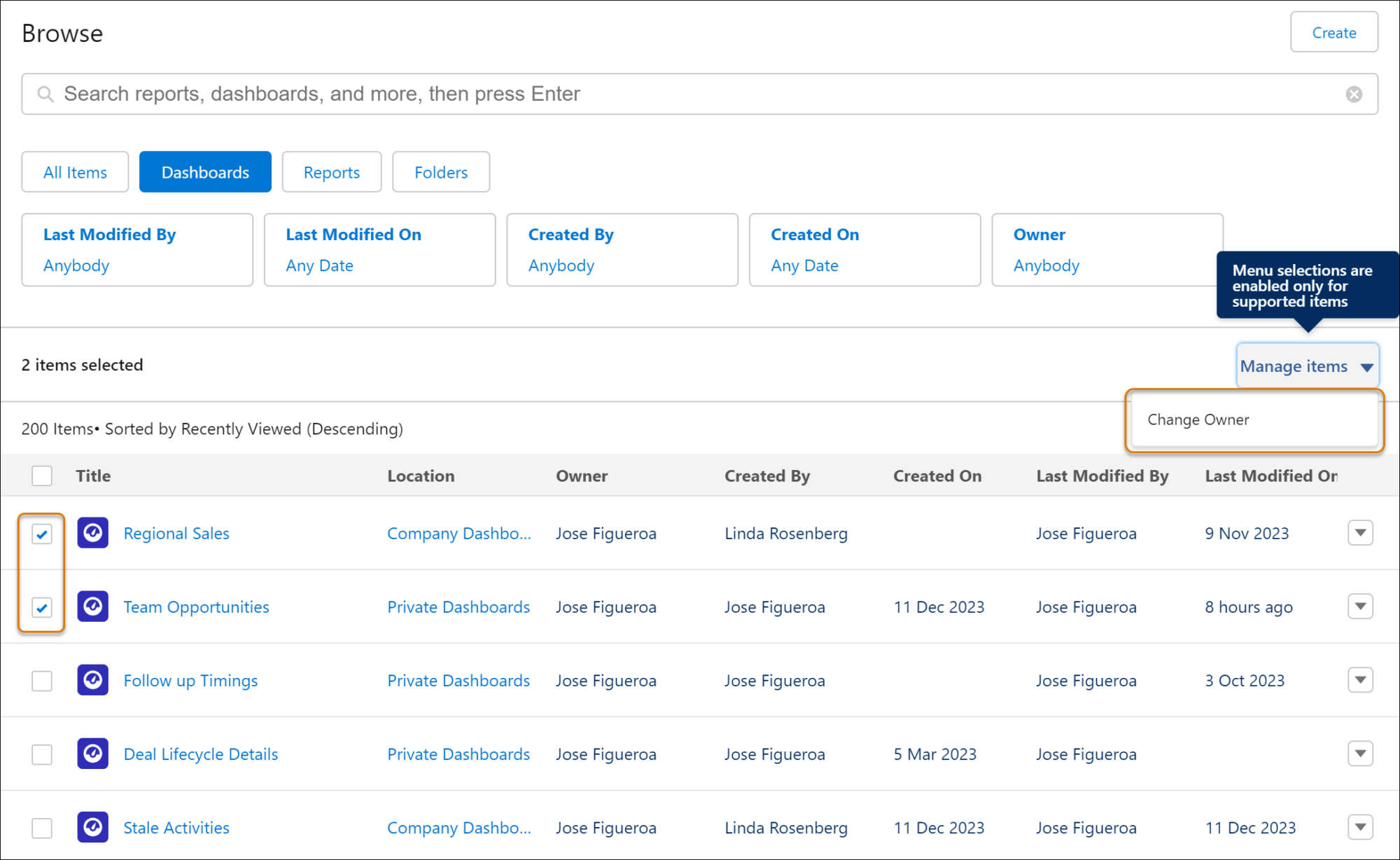
Salesforce has also made it possible to transfer and change Lightning dashboard ownership following a job change or a change in circumstances. There is no need to clone or re-create the dashboard to provide access to a new owner. Select “Change Owner” from the dashboard’s actions to reassign on the Dashboards or Analytics tabs.
Add Fields from Related Objects to Dynamic Forms
Displaying from a parent record to a child record has become simplified with the Salesforce Spring release. Following its launch, you can add a field from another record to your Lightning Page.
Drag the cross-object fields onto your record page to display relevant data from related objects. The Fields tab has a breadcrumb navigation at the top displaying the spans you’ve navigated through. The breadcrumb at the highest level signifies the specific object linked with the page. Fields representing cross-object relationships are marked with an arrow icon (>). Directly drag these fields onto the page or click the arrow icon to review them more.
Set Field Visibility by Device in Dynamic Forms
Before, it was possible to apply visibility rules on Field Sections and various components according to the device form factor, but this feature wasn’t available for individual fields. The recent update enables even more detailed customization of your Lightning record pages for desktop and mobile by adding the option to set visibility restrictions for individual fields based on the device form factor, whether desktop-only or phone-only.
Dynamic Actions with Standard Objects on Mobile
Salesforce is taking personalized experiences further on record pages by using dynamic actions for standard objects on mobile devices. You can assign actions in the Lightning App Builder, applying filters to control when and where actions appear. Set filters based on user fields and form factors, among other criteria.
Einstein Search Enabled by Default
Einstein Search has been activated by default in every Salesforce org, except for those with the DoNotAutoEnable flag activated. If you choose not to use Einstein Search features, disable them from the Search settings page. In earlier versions, organizations without the MySearchPilot and SearchAssistant permissions did not enable Einstein Search.
Stay Ahead with Advanced Cloud Solutions: Master the Salesforce Spring ’24 Release!
The Salesforce Spring ’24 release is here, bringing powerful updates designed to revolutionize your Salesforce experience. With Advanced Cloud Solutions, learn about these changes and elevate your Salesforce game.
Explore the full spectrum of our latest updates, from the visually enhanced Lightning dashboard to the versatile dynamic forms. Ensure you’re making the most of these innovations, including the powerful Einstein Search and the customization capabilities of dynamic actions for mobile experiences.
Contact Advanced Cloud Solutions today to discuss how you can stay ahead and up to date with all the latest Cloud services that can benefit your organization.
- Primary Image Source: Envato
- Secondary Image Source: Salesforce